Widgets or gadgets are small specialized applications that run on your website or your computer’s desktop to provide a specific piece of additional functionality. According to Wikipedia, widgets and gadgets are …
… downloadable interactive virtual tools that provide services such as showing the user the latest news, the current weather, a dictionary, a map program, sticky notes, or even a language translator, among other things.
Desktop widgets and gadgets are really useful for personal advertising because they can display messages in your peripheral vision while you are working. One of best advertising methods I’ve discovered is to set up a widget with a little slideshow of rotating pictures and position it in the corner of my screen. I also have another one with rotating bits of text. Each of them changes every few minutes and reminds me about a variety of things I’d like to do, be and have.
Windows Vista and Mac Tiger each come with some basic widget/gadgets. You can go online and find many more to download. Collections of widgets and gadgets are also available from Yahoo, Google, and several other vendors. Instructions for developing widgets are open to the public so there are hundreds to choose from and they are usually free. Some of them are really cool.
Macintosh and Yahoo call these little software tools widgets; Google and Vista call them gadgets. They are all basically referring to the same thing, so for the rest of this article I will refer to them collectively as widgets. (Klips are the widgets for an engine called KlipFolio which I don’t use, but it sounded great in the title.)
Here are some of the major widget collection sites:
- Google – desktop.google.com/plugins
- Yahoo – widgets.yahoo.com/gallery
- Mac – www.apple.com/downloads/dashboard and www.dashboardwidgets.com
- Vista – gallery.live.com
- All platforms – www.widgipedia.com
While Macintosh Tiger and Windows Vista have widget functionality built in, you will need to download the widget “engine” to run Google and Yahoo widgets. Once the engine software is installed, it is an easy matter to download and configure your widgets. Since I’m primarily a Windows user and most of us are not using Vista yet, I’ll show you how to download and configure the Google widget engine in the next article.
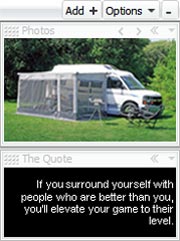
Note: In September 2011, Google announced it would discontinue a number of its products, including Google Desktop. Although Desktop could do several cool things, TBYB! was primarily interested in the Photos gadget, which was a handy way to display a small photo slideshow in the corner of your computer’s screen while working on something else. We also used The Quote gadget, which did the same thing with text. Slideshows are one of the very best ways to advertise to yourself, so we’re sad to see Google Desktop go. Fortunately there are several other ways to automatically deliver a rotating collection of pictures or text.
Other articles in the Google Gadget series
- Widgets and gadgets and klips (oh my!) (you are here)
- How to install Google Desktop
- How to use Google Sidebar and Gadgets
- How to rotate picture ads with the Google Photos gadget
- How to rotate text ads with The Quote gadget
Leave a Reply